
Image Aspect Ratio Calculator and Crop Tool
An aspect ratio is simply width compared with height — 1920 × 1080 is 16:9. Enter your dimensions to find and simplify the ratio, calculate a new width or height that keeps it, or open an image and crop it to a new ratio without uploading it anywhere.
- Free to use
- No sign-up
- Runs in your browser
Quick answer
To find the aspect ratio of an image, enter its width and height in pixels. Divide both numbers by their greatest common divisor to reduce the ratio: 1920 × 1080 becomes 16:9. Use the same ratio to resize without stretching, or crop the photo if you need a different shape.
Aspect ratio calculator
Crop an image to a ratio
Image Size Reference Pack
Printable aspect ratio cheat sheet, a social media and print size chart, an Excel resize calculator and a photo crop planning worksheet.
- Cheat sheet (PDF)
- Print sizes (PDF)
- Resize calculator (XLSX)
- Crop worksheet (PDF/DOCX)
Formats: PDF, XLSX, DOCX. Instant download after payment (link valid 72 hours, up to 5 downloads). AI-assisted: the templates were drafted with AI help and reviewed and laid out before publishing.
$3.00 USD, one-time 4 files · about $0.75 each
- Instant download
- 7-day refund
- Secure checkout by Stripe
7-day money-back guarantee. Full refund within 7 days of purchase, even after you download.
Free sample: Aspect Ratio Cheat Sheet (PDF, 58 KB)
Full refund within 7 days — see the refund policy and license.
Free printables
Single sheets you can print right now, no sign-up. The full pack adds every sheet in one download plus the editable files.
 Printable Image Crop Worksheet
Common image sizes and ratios
Use these exact reductions as quick checks for common pixel dimensions.
| Image size | Simplified ratio | Decimal | Common use |
|---|---|---|---|
| 800 × 800 | 1:1 | 1.000 | Square image |
| 1080 × 1080 | 1:1 | 1.000 | Square post |
| 1080 × 1350 | 4:5 | 0.800 | Portrait post |
| 1200 × 1800 | 2:3 | 0.667 | Photo print shape |
| 1536 × 2048 | 3:4 | 0.750 | Tablet/phone photo |
| 1080 × 1920 | 9:16 | 0.563 | Vertical video |
| 1600 × 1200 | 4:3 | 1.333 | Camera photo |
| 6000 × 4000 | 3:2 | 1.500 | DSLR photo |
| 1920 × 1080 | 16:9 | 1.778 | HD video |
| 2560 × 1080 | 64:27 | 2.370 | Ultrawide screen |
How to calculate an aspect ratio
- Take the width and height in pixels (or any unit).
- Find their greatest common divisor (GCD).
- Divide both by the GCD: 1920 ÷ 120 = 16 and 1080 ÷ 120 = 9, so 1920 × 1080 is 16:9.
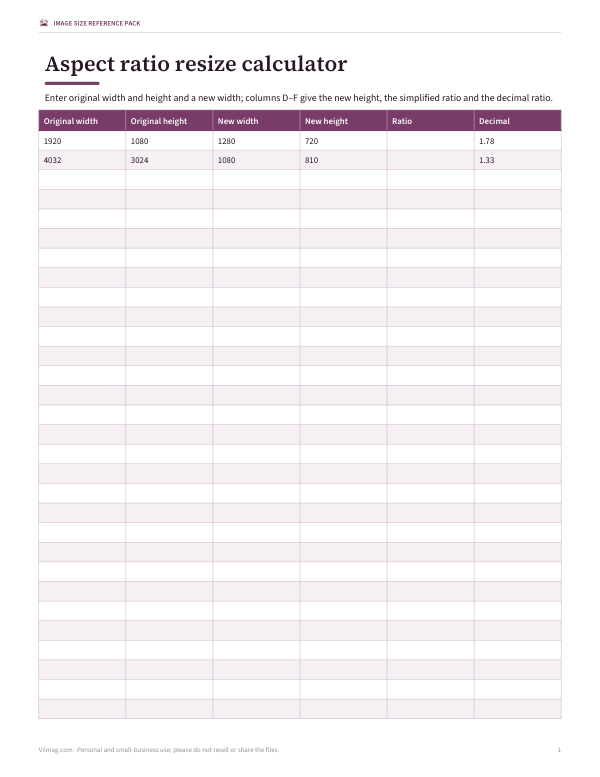
- For resizing, keep the ratio: new height = new width × height ÷ width.
Some sizes don’t simplify neatly — 1366 × 768 simplifies only to 683:384 — so it’s also useful to see the decimal ratio (1.78:1) and the closest common ratio (16:9).
Common aspect ratios
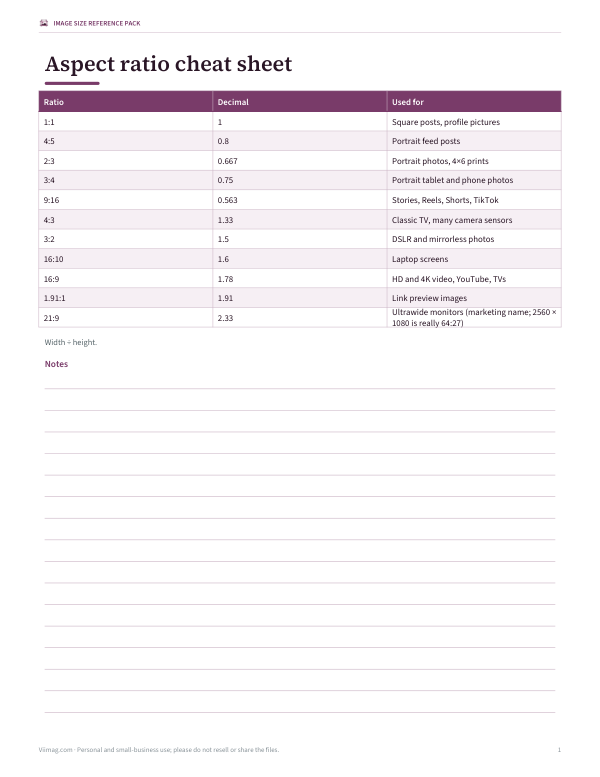
| Ratio | Decimal | Example size | Used for |
|---|---|---|---|
| 1:1 | 1.000 | 1080 × 1080 | Square posts, profile pictures |
| 4:5 | 0.800 | 1080 × 1350 | Portrait feed posts |
| 2:3 | 0.667 | 1000 × 1500 | Portrait photos, 4×6 prints |
| 3:4 | 0.750 | 1536 × 2048 | Portrait tablet and phone photos |
| 9:16 | 0.563 | 1080 × 1920 | Stories, Reels, Shorts, TikTok |
| 4:3 | 1.333 | 1024 × 768 | Classic TV, many camera sensors |
| 3:2 | 1.500 | 6000 × 4000 | DSLR and mirrorless photos |
| 16:10 | 1.600 | 1920 × 1200 | Laptop screens |
| 16:9 | 1.778 | 1920 × 1080 | HD and 4K video, YouTube, TVs |
| 1.91:1 | 1.910 | 1200 × 628 | Link preview images |
| 21:9 | 2.333 | 2560 × 1080 | Ultrawide monitors (marketing name; 2560 × 1080 is really 64:27) |
Social platforms change their recommended sizes from time to time — check each platform’s current guidance before a campaign.
Print sizes and their ratios
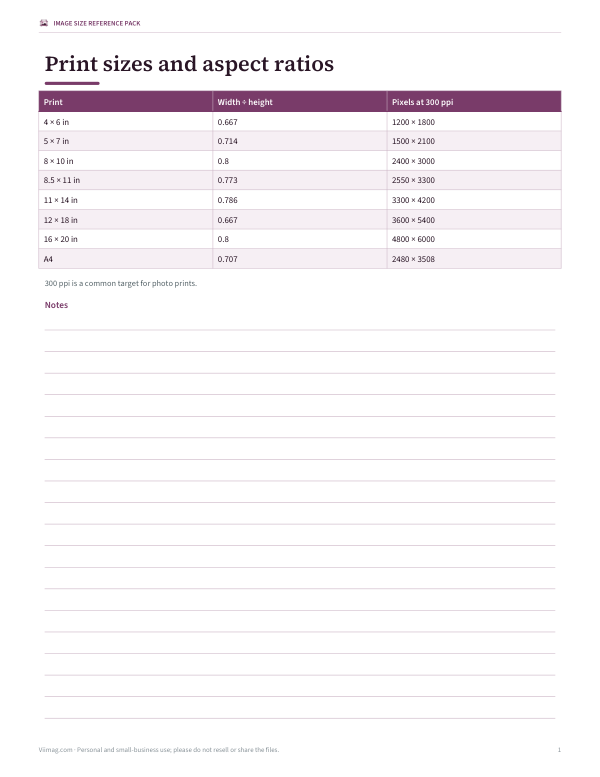
| Ratio | Long ÷ short | Crops from a 3:2 photo? | |
|---|---|---|---|
| 4 × 6 in | 2:3 | 1.500 | No — same ratio |
| 5 × 7 in | 5:7 | 1.400 | Yes, some cropping |
| 8 × 10 in | 4:5 | 1.250 | Yes, some cropping |
| 8.5 × 11 in | 17:22 | 1.294 | Yes, some cropping |
| 11 × 14 in | 11:14 | 1.273 | Yes, some cropping |
| 12 × 18 in | 2:3 | 1.500 | No — same ratio |
| 16 × 20 in | 4:5 | 1.250 | Yes, some cropping |
| A4 (210 × 297 mm) | 1:√2 | 1.414 | Yes, some cropping |
A 4 × 6 print matches the 3:2 shape of most camera sensors exactly; 8 × 10 and 5 × 7 prints need cropping. A-series paper keeps the same 1:√2 ratio at every size, so A4 scales to A3 without cropping.
Worked example
A creator has a 4032 × 3024 photo from a phone. The calculator simplifies it to 4:3 (1.333:1). To use it as a 1080-pixel-wide Instagram portrait post at 4:5, they open the image in the crop tool, choose 4:5 and “Centre”: the result is 2419 × 3024 pixels, keeping 60% of the original. For a YouTube thumbnail at 16:9 they switch the target and crop position to “Top / left” so a face near the top stays in frame, then resize the width to 1280, which gives a height of 720.
Video resolutions by aspect ratio
| Name | Resolution | Ratio |
|---|---|---|
| SD (NTSC, square pixels) | 640 × 480 | 4:3 |
| HD 720p | 1280 × 720 | 16:9 |
| Full HD 1080p | 1920 × 1080 | 16:9 |
| QHD 1440p | 2560 × 1440 | 16:9 |
| 4K UHD | 3840 × 2160 | 16:9 |
| DCI 4K (cinema) | 4096 × 2160 | about 1.9:1 |
| Vertical Full HD | 1080 × 1920 | 9:16 |
| WUXGA | 1920 × 1200 | 16:10 |
Every 16:9 resolution in the table simplifies to exactly 16:9, which is why video can be scaled between them without cropping or bars.
Aspect ratio vs resolution vs file size
Aspect ratio describes shape only; resolution describes how many pixels the image has; file size depends on resolution, format and compression. A 1080 × 1080 image and a 400 × 400 image are both 1:1, but the larger one shows more detail. When a platform asks for a ratio, match the shape first, then export at or above its recommended resolution so the platform doesn’t have to enlarge your image.
Designing for several ratios at once
- Shoot or design at a generous size with space around the subject.
- Keep text and faces inside a central “safe area” that survives 1:1, 4:5 and 16:9 crops.
- Crop separately for each platform rather than stretching one image.
- Check thumbnails, where the image may be cropped again automatically.
- Export at the platform’s recommended pixel size for sharp results.
Cropping vs letterboxing
- Cropping removes part of the image to change its shape — nothing is distorted.
- Letterboxing or pillarboxing adds bars to fit a different shape without losing content.
- Stretching changes the ratio by distorting the image — avoid it for photos and faces.
- Leave important subjects away from the edges if an image will be shown in several ratios.
Privacy
Images are cropped on your device with the browser’s canvas — nothing is uploaded.
Frequently asked questions
Is picture ratio the same as image aspect ratio?
Yes. Picture ratio, image ratio, and aspect ratio all describe the same thing: the proportional relationship between width and height.
Can I edit a photo aspect ratio online without uploading it?
Yes, if the tool works in your browser. This page crops the image with the browser canvas, so the image stays on your device.
Can I change image ratio without cutting anything off?
Only by adding empty space, such as letterboxing or pillarboxing. If you change the ratio by cropping, some pixels are removed; if you stretch it, the image is distorted.
What is the aspect ratio of 1920 × 1080?
16:9.
How do I keep the aspect ratio when resizing?
New height = new width × original height ÷ original width.
What aspect ratio is 1080 × 1350?
4:5.
What aspect ratio is a 4 × 6 photo?
2:3 (or 3:2 in landscape).
Does cropping reduce quality?
It removes pixels but doesn’t blur the remaining ones; resizing up can soften an image.
Are my images uploaded?
No. Cropping happens in your browser.
What is 21:9 really?
A marketing name for ultrawide formats like 2560 × 1080, which is actually 64:27 (about 2.37:1).
How do I find the ratio of an odd size?
Divide width and height by their greatest common divisor, or compare the decimal with common ratios.
What aspect ratio is an iPhone photo?
Most iPhone camera photos are 4:3, such as 4032 × 3024.
Can I crop to a custom ratio?
Choose the closest preset, or resize the width and height with the calculator to plan a custom crop in your editor.